iPhone 15 Loudspeaker Replacement
Use this guide to replace the loudspeaker in your iPhone 15.
If the sound coming through your iPhone sounds like static or crackling, and it's not due to a software issue, your loudspeaker may need to be replaced.
- You'll need replacement back glass adhesive to complete this repair.
Step 1 | Prepare your phone for disassembly


- Allow your phone's battery to drain below 25%. A charged lithium-ion battery can be a safety hazard.
- Unplug any cables from your phone.
- Hold the power and either volume buttons, then slide to power off your phone.
Step 2 | Tape over any cracks


- If your screen or back glass is badly cracked, lay overlapping strips of packing tape over the glass to protect yourself and make disassembly easier.
- Make sure there's a smooth area near the bottom edge that's big enough for a suction cup to stick to.
Step 3 | Mark your opening picks


- If inserted too far, an opening pick can damage your device. Follow this step to mark your pick and prevent damage.
- Measure 3 mm from the tip and mark the opening pick with a permanent marker.
- You can also mark the other corners of the pick with different measurements.
- Alternatively, tape a coin to a pick 3 mm from the tip.
Step 4 | Remove the pentalobe screws


Use a P2 pentalobe driver to remove the two 7.7 mm-long screws on either side of the charging port.
Step 5 | Heat the bottom edge

- Use a hair dryer or heat gun to heat the bottom edge of the back glass until it's hot to the touch.
- Be careful not to heat the phone hotter than this—the battery is susceptible to heat damage.
Step 6 | Insert an opening pick


- Apply a suction handle to the bottom edge of the back glass.
- Pull up on the handle with a strong, steady force to create a gap between the back glass and the frame.
- Insert the tip of an opening pick into the gap.
Step 7 | Back glass information

- As you slice the adhesive securing the back glass in the next steps, be careful of the following areas:
- There's a delicate cable connecting the back glass to the phone, right next to the volume down button. Don't insert your pick here to avoid slicing the cable.
- There are multiple spring contacts around the perimeter of the phone. Be extra careful not to insert your pick deeper than suggested in each step to avoid bending these contacts.
Step 8 | Separate the bottom edge adhesive


- Don't insert your opening pick deeper than 5 mm along the bottom edge.
- Slide your pick back and forth along the bottom edge to separate the adhesive.
- Leave your pick inserted in the bottom right corner to prevent the adhesive from re-sealing.
Step 9 | Heat the right edge

- Heat the right edge of the back glass until it's hot to the touch.
Step 10 | Separate the bottom right corner adhesive


- Don't insert your pick deeper than 7 mm along the right edge.
- Rotate your pick around the bottom right corner and slide it to the volume down button or until you feel a hard stop at a large clip securing the back glass.
Don't slice past the volume buttons to avoid damaging the wireless charging cable.
Leave this pick inserted to prevent the adhesive from resealing.
Step 11 | Heat the left edge

- Heat the left edge of the back glass until it's hot to the touch.
Step 12 | Separate the left edge adhesive


- Along the left edge, don't insert your pick deeper than 5 mm.
- Insert a second opening pick at the bottom edge.
- Rotate the second pick around the bottom left corner.
- Slide this pick up to the top left corner to separate the adhesive.
Leave this pick inserted to prevent the adhesive from resealing.
Step 13 | Heat the top edge

Heat the top edge of the back glass until it's hot to the touch.
Step 14 | Separate the top edge adhesive


- Don't insert your pick deeper than 3 mm along the top edge.
- Rotate your second opening pick around the top left corner and slide it to the top right corner to separate the adhesive.
- You might hear and feel clicks as the top two clips release.
- Leave this pick in place to prevent the adhesive from resealing.
Step 15 | Heat the top right corner

Heat the top right corner of the back glass until it's hot to the touch.
Step 16 | Separate the top right corner adhesive


- Don't insert your pick deeper than 4 mm along the right edge.
- Rotate the second opening pick around the top right corner and slide it to the volume up button to separate the adhesive.
Step 17 | Open the back glass


- Gently lift and swing open the back glass to the right of the phone.
- If the back glass feels stuck, go back around the perimeter to check for missed sections of adhesive or stuck clips.
- Rest the back glass against a raised surface so it doesn't strain the cable.
Step 18 | Unfasten the lower connector cover

- Throughout this repair, keep track of each screw and make sure it goes back exactly where it came from.
- Use a tri-point Y000 driver to remove the two 1.3 mm-long screws securing the lower connector cover.
Step 19 | Remove the lower connector cover


- Use tweezers to slide the cover toward the top of the phone to unlatch it from the logic board.
- Remove the cover.
Step 20 | Disconnect the battery


- Hold the back glass upright with one hand and rotate it just enough to reveal the battery press connector just below the volume buttons.
- A plus and minus sign is printed on the head of this connector.
- Use the tip of an opening pick to pry up and disconnect the battery press connector from the logic board.
Step 21 | Unfasten the middle connector cover


Use your tri-point Y000 driver to remove the 0.9 mm-long screw securing the middle connector cover.
Step 22 | Remove the cover


- Use the flat end of a spudger or your finger to push the cover toward the bottom of the phone and unclip its top edge.
- Remove the cover.
Step 23 | Disconnect the wireless charging coil


Use an opening pick to pry up and disconnect the wireless charging coil and NFC connector.
Step 24 | Remove the back glass

Remove the back glass.
Step 25 | Unfasten the loudspeaker
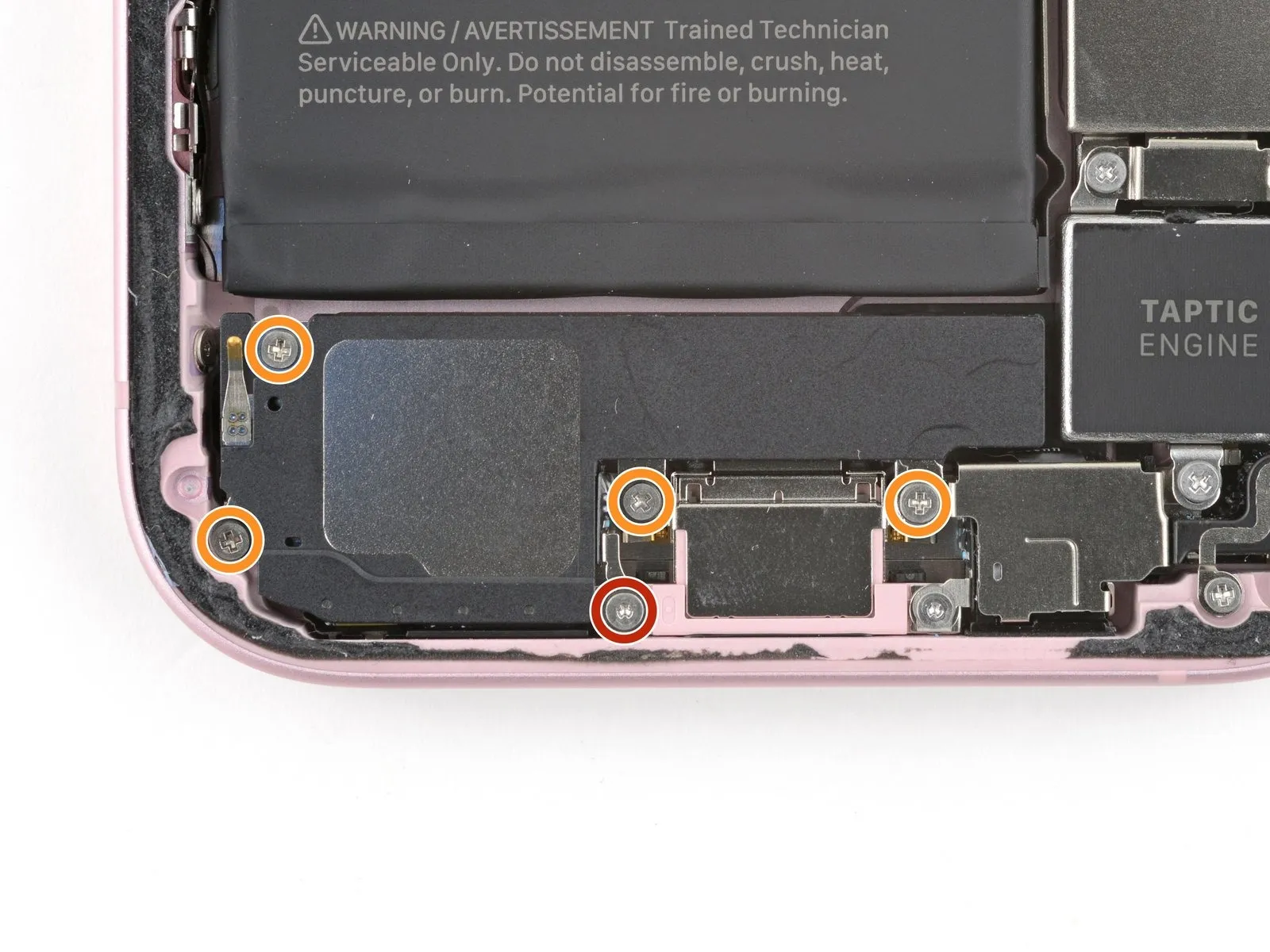
- Use your tri-point Y000 driver to remove the 1.3 mm-long screw securing the grounding clip and loudspeaker.
- Use your Phillips #000 driver to remove the four 1.6 mm-long screws securing the loudspeaker.
Step 26 | Pry up the loudspeaker
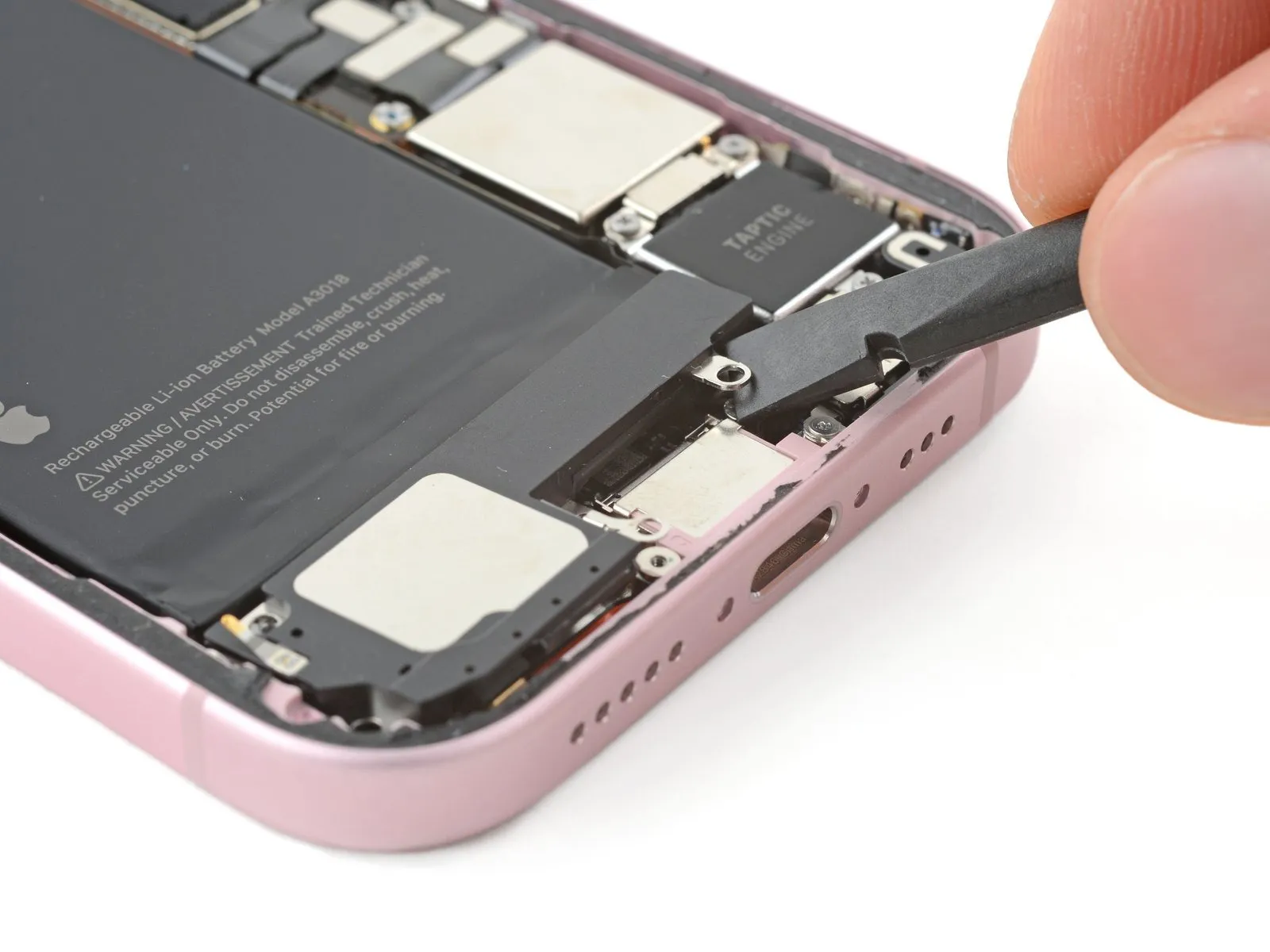
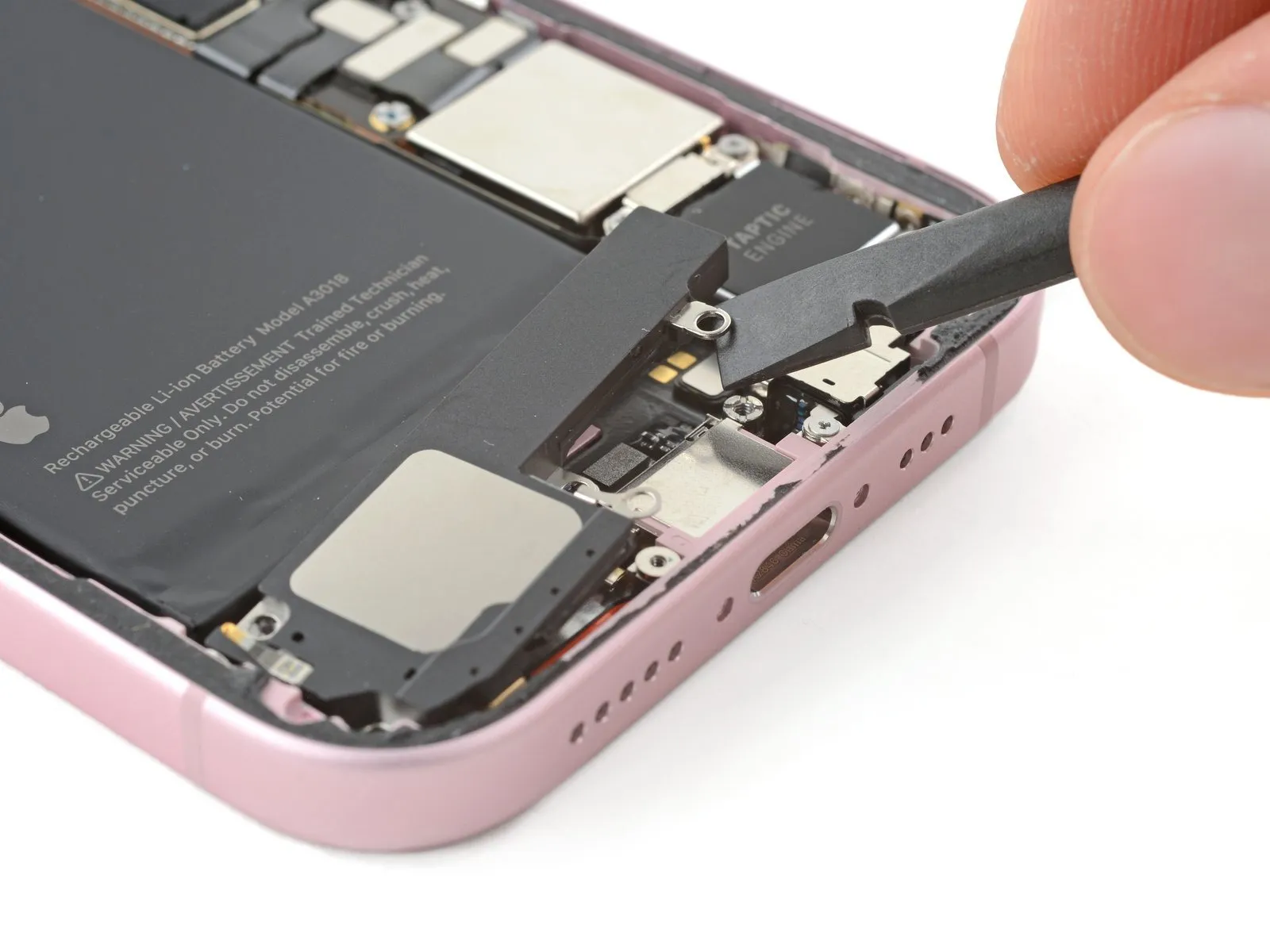
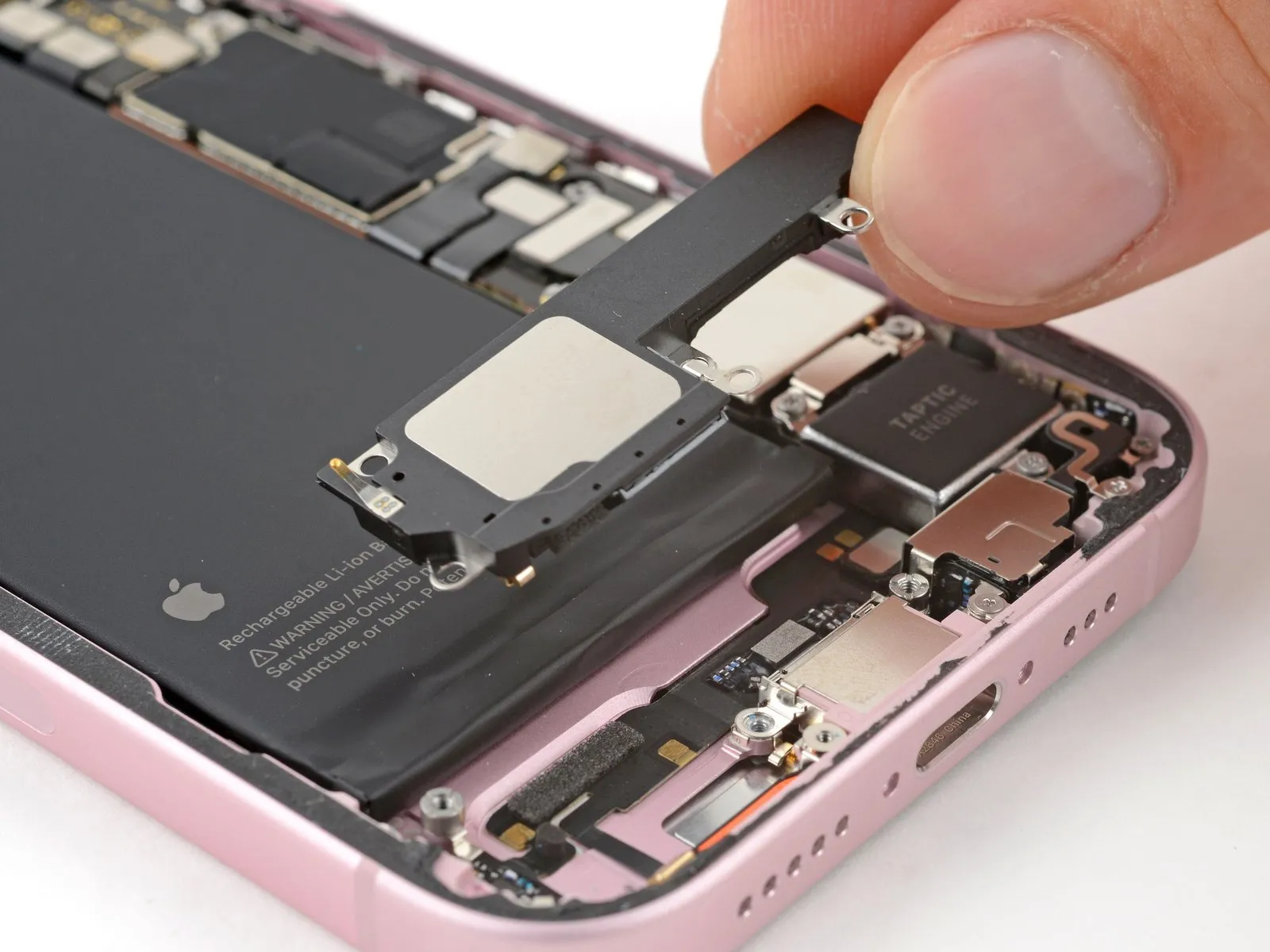
Step 27 | Remove the loudspeaker
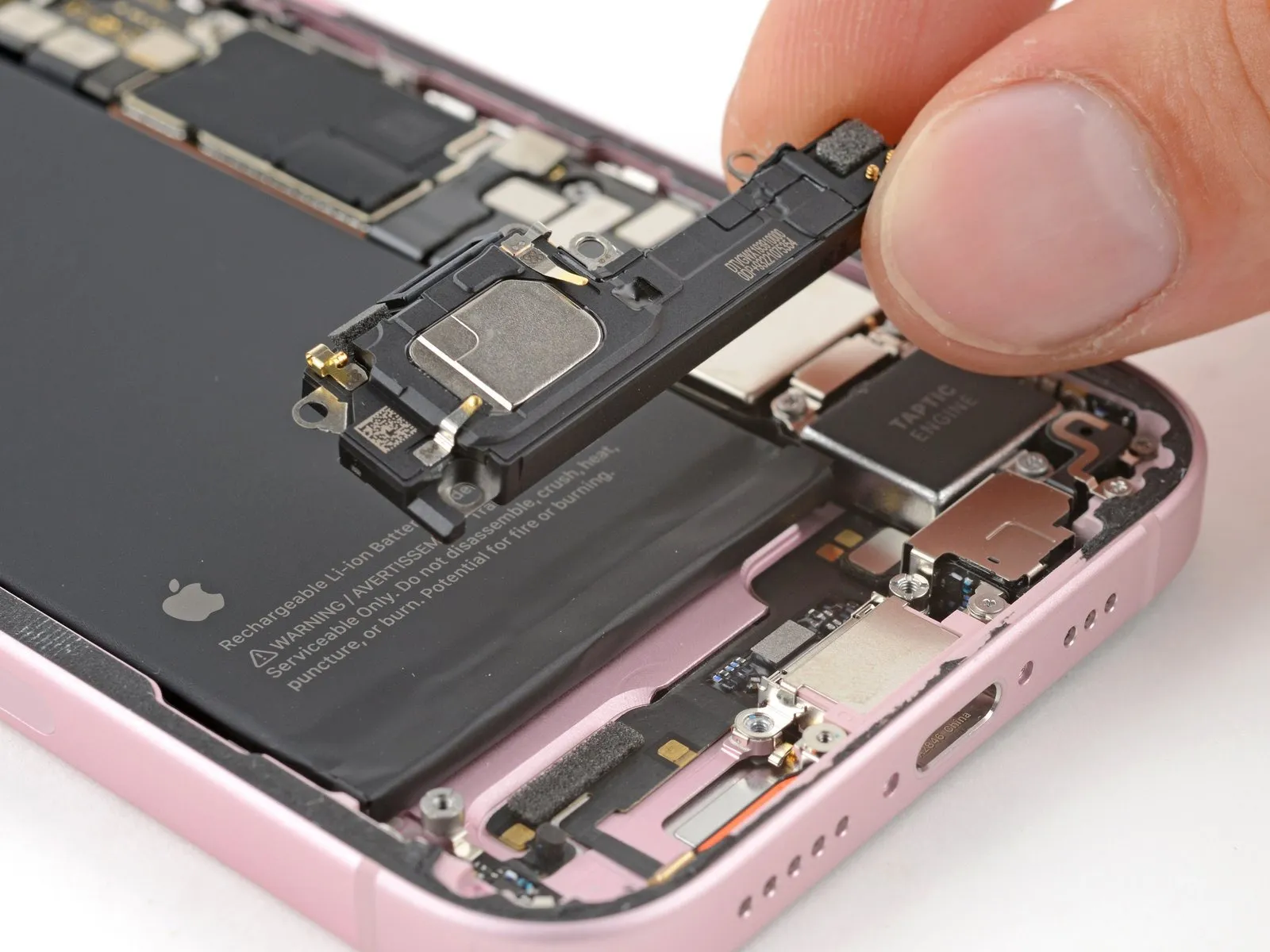
Step 28 | End of disassembly

Congratulations on completing disassembly! The remaining steps will show you how to reassemble your device.
When reconnecting press connectors, align the connector carefully over its socket and press down with your fingertip or spudger-first on one side, then the other-until it clicks into place. Don't try to force the connector into place. If you're having trouble, reposition it and try again.
Step 29 | Place the loudspeaker
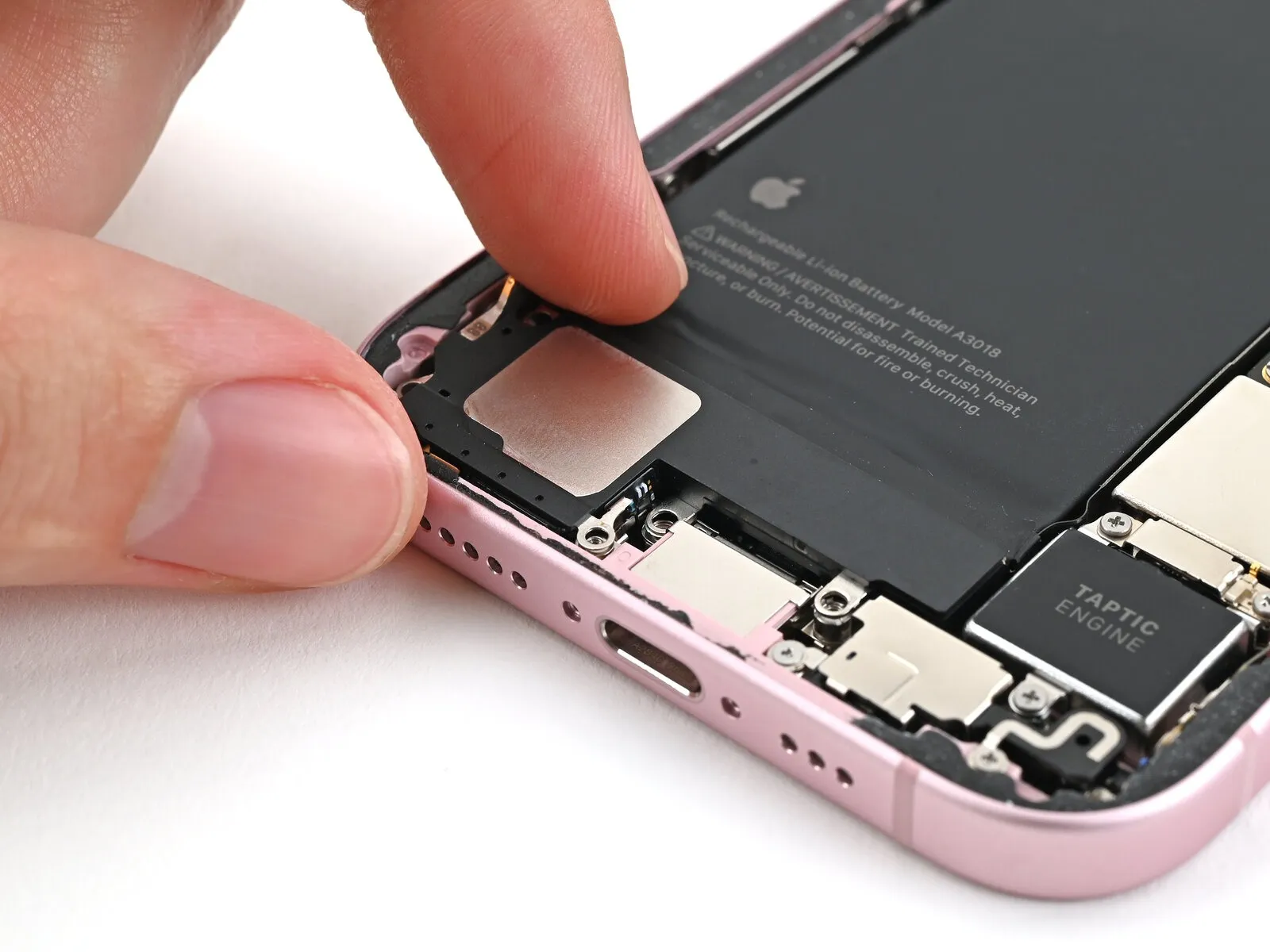
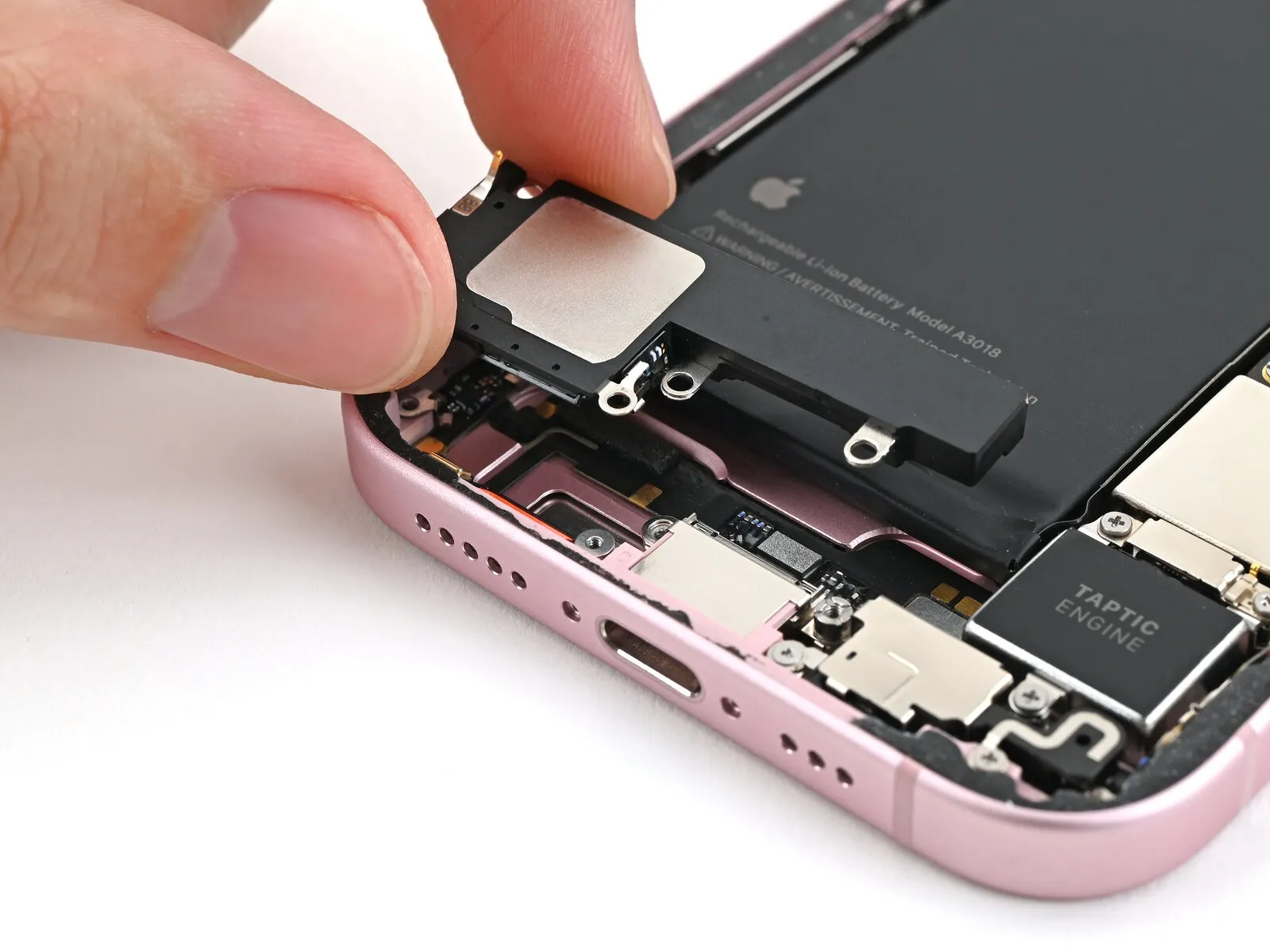
Step 30 | Install the loudspeaker screws
- Use your tri-point Y000 driver to install the 1.3 mm-long screw securing the grounding clip and loudspeaker.
- Use your Phillips #000 driver to install the four 1.6 mm-long screws securing the loudspeaker.
Step 31 | Remove the back glass adhesive


- This is a good point to test your repair before sealing up your phone. Connect the battery and back glass, power on your phone, and make sure it works as expected. Power it back down, disconnect the battery and back glass, and continue reassembly.
- The adhesive remaining on your phone is difficult to remove and leaves residue. If you have trouble removing the adhesive, apply some heat using a hair dryer or heat gun.
- Use the pointed end of a spudger to press and roll the adhesive until you can grip it with a pair of tweezers.
- Use the tweezers to pull the adhesive off of the phone.
Step 32


- Wrap a microfiber or lint-free cloth around the pointed end of a spudger and apply a few drops of high-concentration (greater than 90%) isopropyl alcohol to the cloth.
- Wipe in one direction along the perimeter of the frame to clean the adhesive residue.
- Wait a few minutes before proceeding to make sure any excess alcohol has evaporated.
Step 33 | Orient the adhesive


- Your adhesive may look slightly different.
Step 34 | Apply the adhesive


- Use the pull tab to begin peeling the back liner off the adhesive starting from the bottom, but don't remove the liner all the way.
- Hold the liner out of the way and align the adhesive with the bottom edge of the iPhone.
- Lay the bottom edge of the adhesive into its recess in the frame, making sure the iPhone's spring contacts are aligned with their cutouts in the liner.
Step 35


Step 36


- Continue peeling the back liner off of the adhesive while pressing the adhesive into place along the edges of the iPhone's frame.
- If you correctly aligned the lower edge of the adhesive, the side and top edges will fall perfectly into place. If the adhesive is misaligned, remove it and start over with new adhesive.
- If your adhesive is misaligned and you don't have another set handy, it's okay to temporarily put your iPhone back together and use it normally without any adhesive, but keep in mind that your iPhone's water resistance will be compromised until you install new adhesive.
Step 37 | Press the adhesive into place


- Make sure the liner is aligned properly by checking that all spring contacts and the rear camera are in their cutouts. If they aren't, remove the adhesive and start over with a new sheet.
- Use the flat end of a spudger to press the adhesive into place around the perimeter of the frame.
- Be careful not to touch the spring contacts sticking through the pink liner.
Step 38 | Remove the top liner


- Remove the top adhesive liner.
- Depending on your adhesive, your liner might be split into multiple parts or be a single piece.
Step 39 | Prop up the back glass


- Prop up the back glass along the right edge of the iPhone, using a box or similar sturdy object to support the screen.
- Use the flat end of a spudger or your finger to connect the wireless charging coil press connector, then the battery press connector.
Step 40 | Place the middle connector cover


Place the middle connector cover over the wireless charging coil press connector so it slightly overhangs the slot on the logic board for the bottom clip.
Step 41


- Use your finger to press the cover down on the logic board.
- While pressing it down, slide the cover upward so both metal clips slot into their spots in the logic board.
Step 42 | Place the lower connector cover


- Use tweezers to hook the top of the lower connector cover into its slot on the logic board.
- Lay the lower connector cover over the press connectors.
Step 43 | Install the cover screws


- Use a tri-point Y000 screwdriver to install the 0.9 mm-long screw securing the middle connector cover.
- Use a tri-point Y000 screwdriver to install the two 1.3 mm-long screws securing the lower connector cover.
Step 44 | Remove the final adhesive liners


Use tweezers or your fingers to separate the pull tabs at the bottom of the frame, near the charging port.
Step 45


Step 46


- Hold the back glass over the phone without letting it touch the adhesive, so you can access the remaining liners along the right edge of the phone.
- Use a pair of tweezers or your fingers to remove the remaing liners along the right edge of the phone.
Step 47 | Install the back glass


- Lay the back glass straight down onto the frame and press until the clips engage.
- Press around the perimeter of the back glass to engage all the clips.
Step 48 | Heat the back glass


- To help the adhesive bond, apply heat to the edges of the back glass using an iOpener, hair dryer, or heat gun until it's hot to the touch.
- Firmly press around the perimeter of the back glass. If you have screen vise clamps, use them to strengthen the bond of your new adhesive. If not, keep reading for more ways to secure the back glass.
Step 49 | Press the back glass


- To evenly compress your iPhone and strengthen the bond of the back glass to the frame, you need to account for the camera bump.
- If you have the box your iPhone came in, take the lid and place it on a flat surface.
- If you don't have your original box, skip this step for an alternate method.
- Place your iPhone screen-side-up in the lid of your box with the camera bump in its recess.
- Find something close to the size of your iPhone, but taller than the sides of the box. Stack it on top of the iPhone, followed by a few heavy objects.
- Leave the objects in place for at least thirty minutes. The lighter the objects, the longer they should be left. Ideally, leave them stacked overnight.
Step 50


- If you don't have the original box for your iPhone, follow the next three steps for another method to evenly compress the back glass.
- Place the iPhone screen-side-down on a soft, flat surface.
- Apply tape to the back glass to protect its finish.
Step 51


- Place evenly spaced layers of coins or similarly thick objects on the tape along the edges of the back glass.
- Stack them to a consistent height taller than the camera bump.
Step 52

- Stack multiple books or other heavy objects on your iPhone.
- The coins may leave an impression on the bottom object, so don't use anything valuable.
- Leave the objects in place for at least thirty minutes. The lighter the objects, the longer they should be left. Ideally, leave them stacked overnight.
Step 53 | Install the pentalobe screws
- Use a P2 pentalobe driver to install the two 7.7 mm-long screws on either side of the charging port.